Client Hints vs User-Agent: Configuring Sec-CH-UA Headers for Google Filters
Ready to protect your online identity?
Choose your plan and start running undetectable browser profiles today.
When Chrome deprecated the information density of the classic User-Agent string in favor of User-Agent Client Hints, it created an unexpected problem for the anti-detect ecosystem: a new, more structured fingerprinting surface that many browser profiles configure incorrectly, triggering exactly the verification flows they were built to avoid.
Understanding the Client Hints architecture — and how to configure it correctly — is now a fundamental requirement for any anti-detect setup targeting Google services, Chrome-based detection systems, or any platform that has adopted the Client Hints standard.
The Problem With the Classic User-Agent String
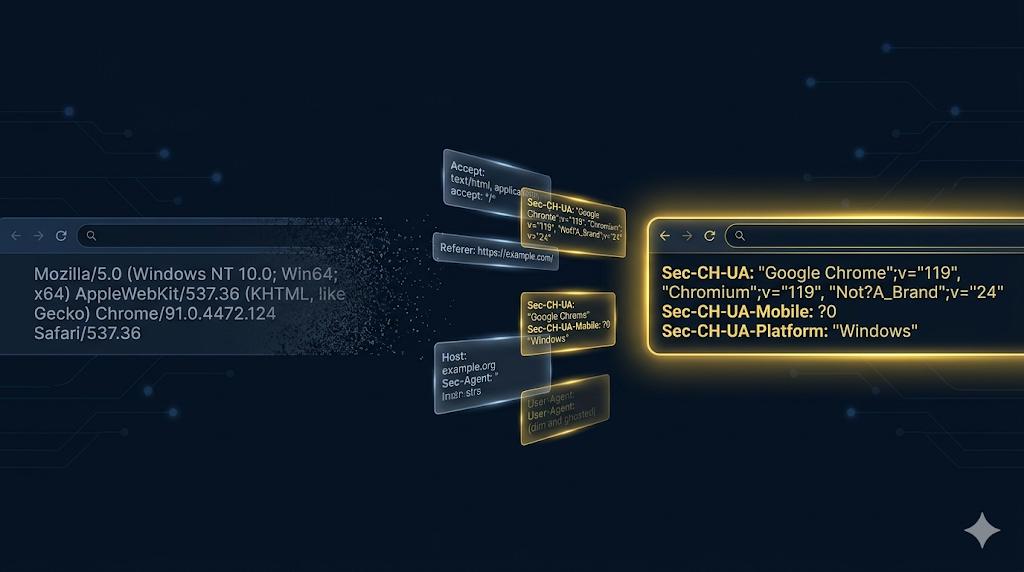
The traditional User-Agent header looks something like this:
Mozilla/5.0 (Windows NT 10.0; Win64; x64) AppleWebKit/537.36 (KHTML, like Gecko) Chrome/124.0.0.0 Safari/537.36This single string was supposed to contain enough information for servers to adapt their responses to the client’s capabilities. In practice, it became a dumping ground for compatibility shims, browser vendor marketing, and historical artifacts — the Mozilla/5.0 prefix on Chrome exists purely because web servers once blocked non-Mozilla browsers.
Google’s Privacy Sandbox team identified two problems: the User-Agent string contains too much information (enabling passive fingerprinting) and is structured in a way that’s difficult to parse reliably. Their solution, Client Hints, was designed to solve both problems — while inadvertently creating new ones for the anti-detect space.
How Client Hints Work
Client Hints is a family of HTTP request headers, each communicating a specific piece of client information only when the server explicitly requests it. The browser sends a limited set of low-entropy hints by default, and the server can request additional high-entropy hints via the Accept-CH response header.
Low-Entropy Hints (Sent by Default)
These headers are sent with every request, even without server opt-in:
Sec-CH-UA: "Google Chrome";v="124", "Chromium";v="124", "Not-A.Brand";v="99"
Sec-CH-UA-Mobile: ?0
Sec-CH-UA-Platform: "Windows"
The Sec-CH-UA header lists the browser brands in a specific format. The Not-A.Brand entry with a rotating version number is a deliberate anti-fingerprinting measure — its version changes to prevent servers from detecting the exact Chrome minor version from the low-entropy headers alone.
High-Entropy Hints (Require Server Opt-In)
These are only sent after the server requests them via Accept-CH:
Sec-CH-UA-Full-Version: "124.0.6367.202"
Sec-CH-UA-Full-Version-List: "Google Chrome";v="124.0.6367.202", "Chromium";v="124.0.6367.202", "Not-A.Brand";v="99.0.0.0"
Sec-CH-UA-Platform-Version: "15.0.0"
Sec-CH-UA-Arch: "x86"
Sec-CH-UA-Bitness: "64"
Sec-CH-UA-Model: ""
Sec-CH-UA-WoW64: ?0
The full version list replaces the abbreviated version in Sec-CH-UA. The platform version reveals the OS version (Windows build number, macOS version, Android version). The arch and bitness fields reveal CPU architecture.
The JavaScript API
Client Hints are also exposed through a JavaScript API, creating a second surface that must be consistent with the headers:
// navigator.userAgentData API
const uaData = navigator.userAgentData;

// Low-entropy properties (synchronous, always available)
console.log(uaData.brands);        // [{"brand":"Google Chrome","version":"124"}]
console.log(uaData.mobile);        // false
console.log(uaData.platform);      // "Windows"

// High-entropy properties (asynchronous, always available in JS)
const highEntropy = await uaData.getHighEntropyValues([
  'fullVersionList',
  'platform',
  'platformVersion',
  'architecture',
  'bitness',
  'model',
  'uaFullVersion'
]);
console.log(highEntropy.platformVersion); // "15.0.0"
console.log(highEntropy.architecture);    // "x86"
Unlike the HTTP headers (which require server opt-in for high-entropy data), the JavaScript API returns high-entropy values on request from any JavaScript running in the page, with no server-side opt-in required. This means detection scripts embedded in page JavaScript have direct access to all Client Hints data.
The Three Mismatch Problems
Anti-detect browser profiles frequently fail Client Hints validation in three distinct ways:
Problem 1: Version Mismatch Between UA String and Client Hints
The classic approach to changing a User-Agent string in a browser profile was to modify the User-Agent header and the navigator.userAgent property. With Client Hints, this is no longer sufficient. A profile that claims Chrome 120 in the User-Agent string but Chrome 124 in Sec-CH-UA is immediately detectable:
# Inconsistent configuration — flagged immediately
User-Agent: Mozilla/5.0 ... Chrome/120.0.0.0 Safari/537.36
Sec-CH-UA: "Google Chrome";v="124", "Chromium";v="124", "Not-A.Brand";v="99"
Detection scripts compare the major version from the UA string against the major version in Sec-CH-UA. Any discrepancy indicates header manipulation.
Problem 2: Platform Mismatch
The Sec-CH-UA-Platform header must be consistent with the OS claimed in the User-Agent string:
# Windows UA string but macOS platform claim — flagged
User-Agent: Mozilla/5.0 (Windows NT 10.0; Win64; x64) ...
Sec-CH-UA-Platform: "macOS"
And the platform version must be consistent with the platform:
# Windows with a macOS-style version number — flagged
Sec-CH-UA-Platform: "Windows"
Sec-CH-UA-Platform-Version: "14.2.1"   # macOS version format, not Windows
Windows platform versions in Client Hints use Windows build numbers, not the familiar 10.0.19045 format. A Windows 11 client reports 15.0.0 in Sec-CH-UA-Platform-Version. A Windows 10 client reports a version in the 10.0.x range corresponding to the specific build.
Problem 3: Architecture Inconsistency
The Sec-CH-UA-Arch and Sec-CH-UA-Bitness fields must be consistent with the hardware profile. A profile claiming Apple Silicon (ARM architecture) must report "arm" in the arch field, not "x86":
# Apple Silicon Mac with x86 architecture claim — impossible combination
Sec-CH-UA-Platform: "macOS"
Sec-CH-UA-Arch: "x86"            # x86 Macs haven't existed since mid-2023
Sec-CH-UA-Bitness: "64"
Sec-CH-UA-Model: ""               # MacBook Pro M3 would have non-empty model in some contexts
The Not-A.Brand Rotation
The Not-A.Brand field with a rotating version number is one of the most commonly misconfigured elements in anti-detect profiles. Chrome intentionally changes this version number to prevent detection of Chrome versions via Client Hints entropy reduction.
According to the WICG User-Agent Client Hints specification, the Not-A.Brand entry is a deliberately arbitrary (GREASE) value: its brand string and version number must match the format of a real brand/version but must NOT match any real browser’s actual value. Chrome determines this value at build time and keeps it constant within a major version, but the specific number is not derived from a public deterministic formula — it is chosen to be arbitrary and non-guessable.
Anti-detect profiles that hardcode a specific Not-A.Brand version will produce a value that may not match what the claimed Chrome version actually ships with:
# Hardcoded Not-A.Brand — may be wrong for the claimed Chrome version
Sec-CH-UA: "Google Chrome";v="124", "Chromium";v="124", "Not-A.Brand";v="8"

# Correct approach: use the value that the actual Chrome build ships with
# Verify by checking a real browser of the target version
Sec-CH-UA: "Google Chrome";v="124", "Chromium";v="124", "Not-A.Brand";v="99"
Anti-detect browsers must maintain an up-to-date lookup table of the correct Not-A.Brand value per Chrome major version, verified against real browser builds, rather than hardcoding or computing a static value.
Google’s Use of Client Hints for Verification Triggers
Google’s various services — Google Ads, Google Analytics, Google Search, YouTube — use Client Hints data as one input into their fraud and anomaly detection systems. The specific mechanisms that trigger verification flows include:
Version Staleness
Google tracks the distribution of Chrome versions actively in use across their user base. A profile presenting a Chrome version that has fewer than approximately 0.1% of active users — either too old or too far ahead of the current release — triggers additional scrutiny. Chrome versions have a typical lifespan of 6-8 weeks before most users auto-update.
Platform-Version Age
The Sec-CH-UA-Platform-Version for Windows encodes the Windows build number. Old Windows builds (e.g., pre-2022 builds) combined with a current Chrome version create an anomaly: Chrome’s minimum OS requirements would prevent a current Chrome version from running on some old builds. Google’s systems flag these impossible combinations.
Rapid Version Changes
A session where the claimed Chrome version changes between requests — or between sessions for the same account — triggers re-verification. Real users don’t change their Chrome version mid-session. Anti-detect profiles that rotate their User-Agent and Client Hints configuration between sessions for the same account create detectable version jump patterns.
Mobile vs Desktop Inconsistency
The Sec-CH-UA-Mobile field uses a structured boolean (?0 for false, ?1 for true). This must be consistent with the entire rest of the profile. A mobile client claiming ?0 (desktop) but with viewport dimensions and touch capabilities that suggest mobile hardware is flagged. A desktop client claiming ?1 (mobile) without corresponding device memory and hardware concurrency values is equally suspicious.
Correct Client Hints Configuration Table
The following table shows the correct Client Hints values for common anti-detect profile configurations:
| Target Profile | Sec-CH-UA-Platform | Sec-CH-UA-Platform-Version | Sec-CH-UA-Arch | Sec-CH-UA-Mobile |
|---|---|---|---|---|
| Chrome 124 / Windows 11 | ”Windows" | "15.0.0" | "x86” | ?0 |
| Chrome 124 / Windows 10 22H2 | ”Windows" | "10.0.19045" | "x86” | ?0 |
| Chrome 124 / macOS Ventura | ”macOS" | "13.6.4" | "arm” (M-series) | ?0 |
| Chrome 124 / macOS Ventura | ”macOS" | "13.6.4" | "x86” (Intel) | ?0 |
| Chrome 124 / Android | ”Android" | "14" | "arm” | ?1 |
| Chrome 124 / Linux | ”Linux" | "6.5.0" | "x86” | ?0 |
The JavaScript API Synchronization Problem
Even with correctly configured HTTP headers, anti-detect profiles fail if the JavaScript API returns inconsistent data. The navigator.userAgentData object must return values consistent with the headers:
// What a detection script checks
const checkConsistency = async () => {
  const brands = navigator.userAgentData.brands;
  const platform = navigator.userAgentData.platform;
  const mobile = navigator.userAgentData.mobile;

  const highEntropy = await navigator.userAgentData.getHighEntropyValues([
    'platformVersion', 'architecture', 'bitness', 'fullVersionList'
  ]);

  // Cross-check: brands in Sec-CH-UA must match fullVersionList
  // platform must match platformVersion format
  // architecture must be consistent with navigator.platform

  return {
    brandsCount: brands.length,
    hasNotABrand: brands.some(b => b.brand.includes('Not')),
    platformVersion: highEntropy.platformVersion,
    arch: highEntropy.architecture
  };
};
Anti-detect browsers that modify HTTP headers via a proxy but don’t patch the navigator.userAgentData JavaScript API will expose the inconsistency to any inline detection script. The fix requires native browser modification — the JavaScript API must be overridden at the browser engine level, not via JavaScript injection (which is itself detectable via toString() checks on the API methods).
The User-Agent String in 2026
Despite the Client Hints transition, the classic User-Agent string hasn’t disappeared. Chrome continues sending it for backwards compatibility, though Google has frozen the OS and CPU architecture information in the string. This “frozen” UA approach means:
- The OS version in the UA string is fixed to a generic value (
Windows NT 10.0for all Windows versions) - The CPU architecture suffix is removed for desktop browsers
- The minor version components may be zeroed out
This creates a new consistency requirement: a profile’s User-Agent string must match the frozen format for the claimed Chrome version, while the full information appears in the Client Hints headers. Anti-detect profiles using older UA string formats (with detailed OS version information) present an anachronistic signal.
# Pre-freeze format (suspicious for modern Chrome)
Mozilla/5.0 (Windows NT 10.0; Win64; x64) AppleWebKit/537.36 (KHTML, like Gecko) Chrome/124.0.6367.202 Safari/537.36

# Post-freeze format (correct for Chrome 110+)
Mozilla/5.0 (Windows NT 10.0; Win64; x64) AppleWebKit/537.36 (KHTML, like Gecko) Chrome/124.0.0.0 Safari/537.36
The zeroed minor version (0.0.0) in the frozen format is correct. Profiles presenting the full version number in the UA string while claiming to be Chrome 110+ are presenting pre-freeze format for a post-freeze browser — a subtle but detectable inconsistency.
Practical Configuration for Anti-Detect Profiles
Correctly configuring Client Hints in an anti-detect profile requires treating it as a coherent system rather than a collection of independent headers. The complete set of values that must be consistent includes:
User-Agentstring (frozen format, correct major version)Sec-CH-UA(brands list with correct Not-A.Brand rotation)Sec-CH-UA-Mobile(matching device type)Sec-CH-UA-Platform(matching OS)Sec-CH-UA-Platform-Version(matching OS version, correct format)Sec-CH-UA-Arch(matching CPU architecture)Sec-CH-UA-Bitness(always “64” for modern Chrome)navigator.userAgent(JavaScript property)navigator.userAgentData.brands(JavaScript API)navigator.userAgentData.platform(JavaScript API)navigator.userAgentData.mobile(JavaScript API)navigator.userAgentData.getHighEntropyValues()(JavaScript async API)navigator.platform(legacy JavaScript property, must be consistent)
Santiago Browser handles this by generating the complete Client Hints configuration space from a single source-of-truth hardware profile, ensuring all headers and JavaScript APIs derive from the same underlying device definition. This prevents the configuration drift that plagues manual Client Hints setup.
The lesson of the Client Hints transition is straightforward: browser fingerprinting has moved from a single monolithic string to a structured, multi-surface data model. Anti-detect systems that haven’t evolved their approach to match this structural change are presenting inconsistencies that Google’s systems are specifically designed to detect.
Ready to protect your online identity?
Choose your plan and start running undetectable browser profiles today.
Earn 15% lifetime commission on every referral.
Become a Partner →